›V-Lookup In Excel by Microsoft Certified: Ravi raval
V-Lookup In Excel by Microsoft Certified: Ravi raval
INTRODUCTION : Let's understand first what V-lookup is and full form of V-lookup. V-lookup means Vertical look-up which means you can only look-up or find the value base on your criteria vertically for the given range. V-lookup has a simple parameter to fulfil. This function is very much useful to
Let's understand first what V-lookup is and full form of V-lookup. V-lookup means Vertical look-up which means you can only look-up or find the value base on your criteria vertically for the given range. V-lookup has a simple parameter to fulfil. This function is very much useful to save your important time and make you feel ease to work.
PARAMETER:
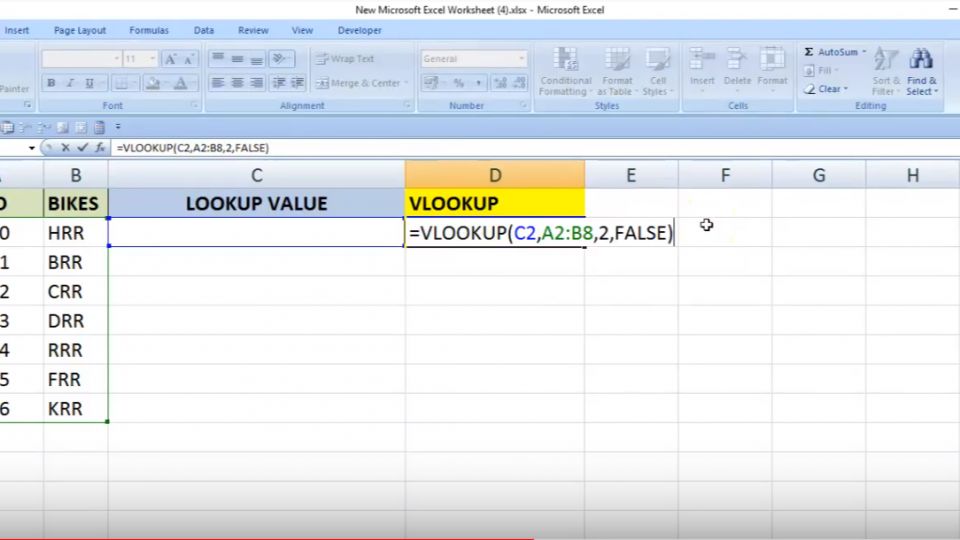
So let understand the parameter of it (=Vlookup(Lookup Value (What you want to find from the give range), Table Array ( Define range ex:(A1:D10) ), Column Index (From which column data you want to extract or find), Select True or False (0 or 1) ( True(0) is for exact match / False (1) is for similar match) Bracket close ).
IMPORTANT NOTE:
One thing you must keep in mind while using V-lookup that if there is same lookup criteria value available more than 1 one time in the same column, V-lookup will give you the result of the 1st value found in the column.Also if your look-up criteria are is column B and you want the value to be extracted from column A then you will get a reference error as V-lookup only lookup from left to rightSo please keep this is the basic rule in mind to follow while using the V-lookup function in excel.
EXAMPLE:
Let understand with a real example. Suppose you have a list of 1000Name in column A, Birth Date In Column B, City In Column C and you want to find out the birth date of particular person based on name (Column A) how you will do it if you don't have any knowledge or idea of V-lookup, obviously, you will scroll down and will lookup for each and every name to find It outright? Now here the V-lookup play a very important role to find out the result in just a second rather than to go through each and every row to find the value. So let say I need to find out the birth date of Ravi from 1000 name list and I don't know whether it's there in the list or not and if its in list then in which cell it is available, Formula =Vlookup("Ravi",A1:D1000,2,0)
If you have any query or doubt please ask me in a comment and I will reply to it ASAP. I hope you found this helpful. For more information and to learn more about excel formula and function please follow me on 25hournews.com/profile/ravi-raval/432
Disclaimer: The opinions expressed within this article are the personal opinions of the author. The facts and opinions appearing in the article do not reflect the views of 25hrNews and 25hrNews does not assume any responsibility or liability for the same.








 (+91) 8081113111
 pr@25hrnews.com

Ravi Raval
Monish Solanki